
Browse help sections
Layouts
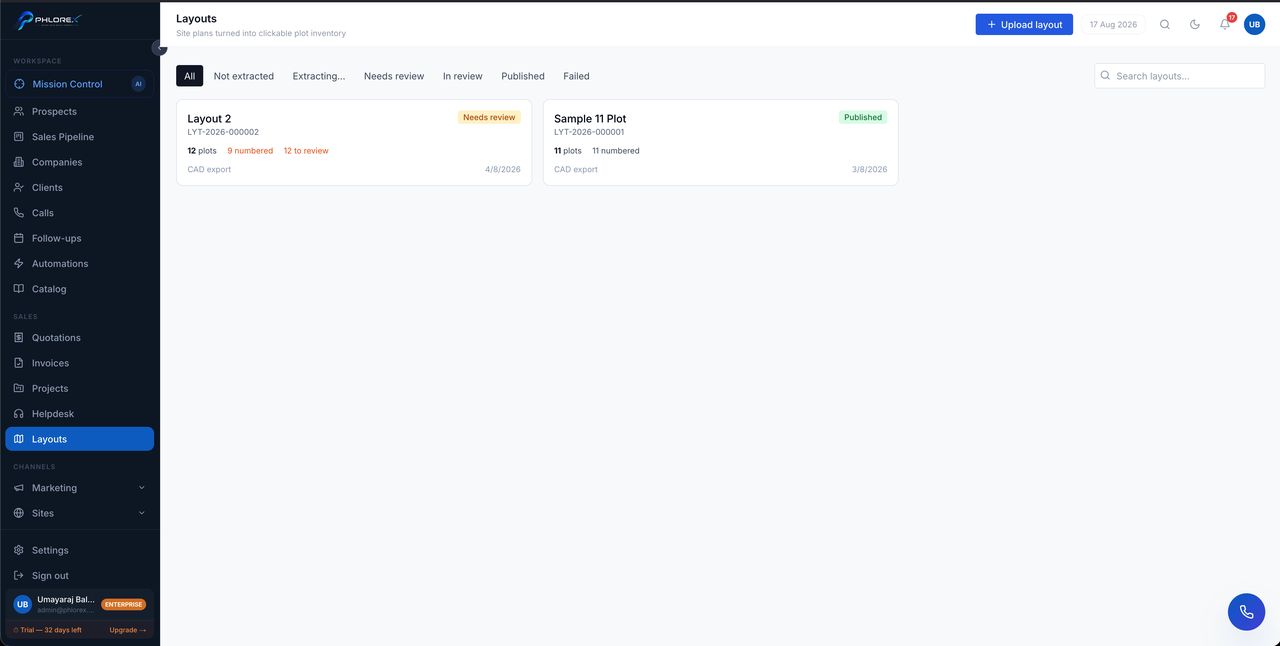
Layouts turn a site plan into clickable plot inventory. You upload the plan you already have, LeadOS extracts the individual plots, you check the result, and it becomes something you can sell from and share.
Upload a plan
- Select Upload layout.
- Choose your site plan file — a CAD export gives the cleanest extraction.
- Wait while LeadOS extracts the plots. The layout shows as Extracting while it works.
- Open it when it reaches Needs review.
The lifecycle
| Status | What it means |
|---|---|
| Not extracted | Uploaded, extraction not started |
| Extracting… | Being processed |
| Needs review | Plots found — your turn to check them |
| In review | Someone is working through it |
| Published | Live and usable |
| Failed | Extraction did not succeed — try a cleaner export |
Reviewing plots
Each layout card summarises the work left: how many plots were found, how many are numbered, and how many still need review — for example *12 plots · 9 numbered · 12 to review*. Work through the unnumbered and unreviewed ones until the counts agree.
Your review decisions survive re-extraction. If you upload a better version of the same plan, the numbering and corrections you have already made are not thrown away.
Extraction quality follows the source. A CAD export extracts far more reliably than a photograph or a flattened image of a printed plan.
Each layout gets a reference such as LYT-2026-000002, and the list can be filtered by status or searched by name.
Cannot find what you need?
Something not behaving as described here? Tell us and we will fix the page.