
Browse help sections
Quotations
PRORequires the pro plan or above.
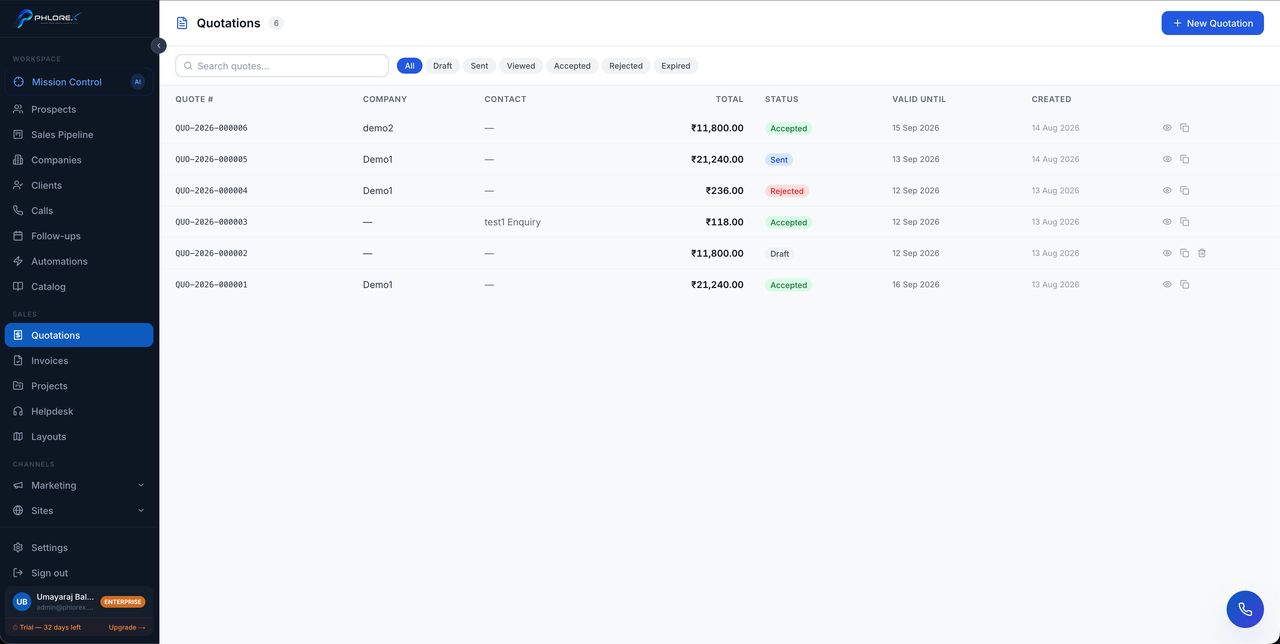
Send a priced proposal, let the customer accept it online, and turn it into an invoice without retyping anything.
Sales›Quotations
- Select New quotation and choose the company or prospect.
- Add line items — description, quantity, price. Pull from Catalog if you have one.
- Set tax, discount and validity date.
- Preview the PDF to see exactly what the customer will see.
- Send it.
Statuses
| Status | Meaning |
|---|---|
DRAFT | Not yet sent — still editable |
SENT | With the customer, awaiting a decision |
VIEWED | They have opened it |
ACCEPTED | Agreed — ready to invoice |
REJECTED | Declined. Worth recording why in a note |
EXPIRED | Passed its validity date |
After acceptance
| Action | What happens |
|---|---|
| Convert to invoice | Creates an invoice with the same lines |
| Create project | Starts a delivery project from the accepted work |
| Duplicate | Copies it as a starting point for a similar quote |
Tip
Duplicate is the fastest way to quote. Build one good quotation for your commonest job and copy it rather than starting blank.
Cannot find what you need?
Something not behaving as described here? Tell us and we will fix the page.