
Browse help sections
Connect Instagram
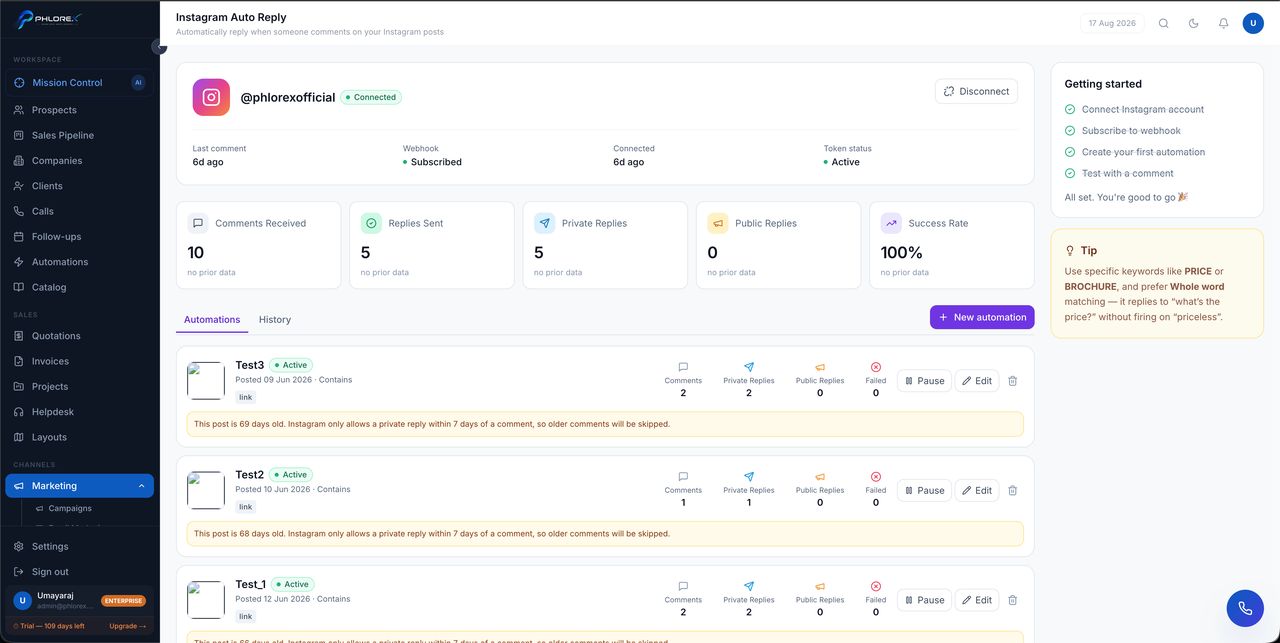
Connecting Instagram lets LeadOS read comments on your posts, so your team can moderate them, reply, and turn genuine enquiries into prospects.
Marketing›Instagram
Before you start
Your account must be a Business or Creator account, not personal. Switch it in the Instagram app under Settings → Account type.
- Select Connect Instagram.
- Sign in and approve the requested access.
- You return with the account listed as connected.
Confirm it is really working
The Auto Reply screen shows the four things that must be true: account connected, webhook Subscribed, an automation created, and tested with a comment. Token status must read Active.
Take care
A connected account with an unsubscribed webhook receives nothing. If comments are not appearing, check that indicator before anything else.
| Capability | Available |
|---|---|
| Read comments on your posts | Yes |
| Reply to and hide comments | Yes |
| Auto-reply by keyword | Yes |
| Private reply to a commenter | Yes — within 7 days of their comment |
| A full direct-message inbox | No |
Next: Instagram Auto Reply.
Cannot find what you need?
Something not behaving as described here? Tell us and we will fix the page.