
Browse help sections
Connect email sending
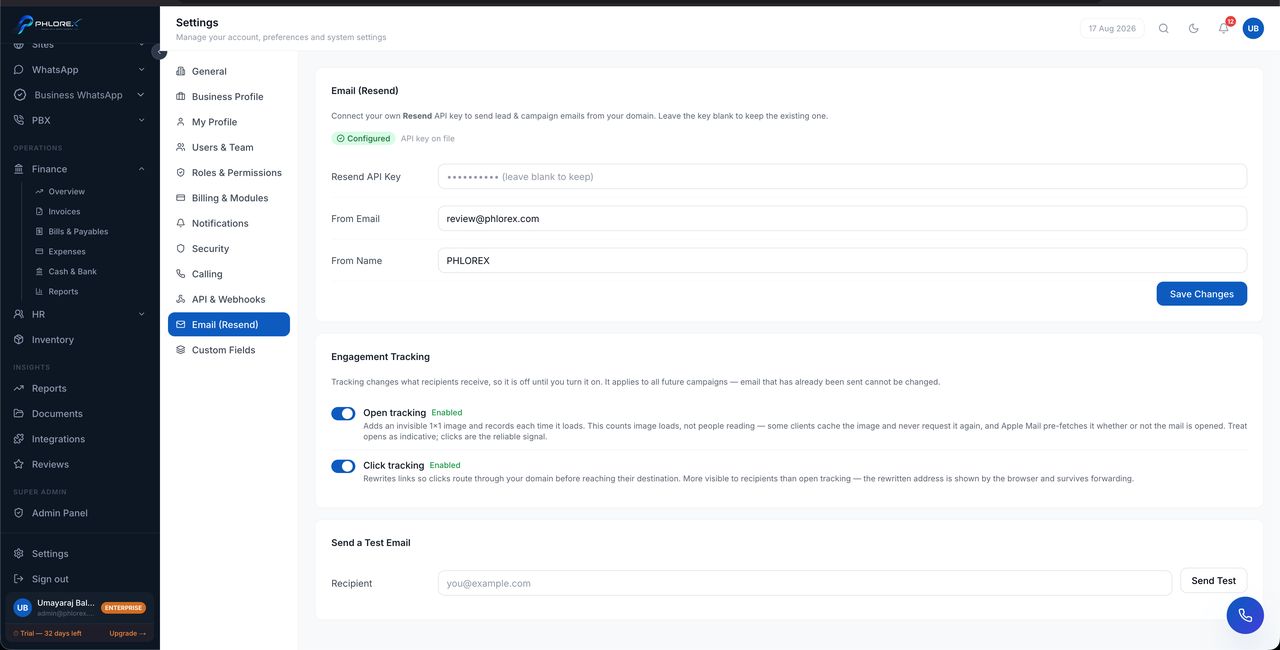
Connecting a sender lets LeadOS send follow-up emails from a prospect's profile and run email campaigns, with every send logged automatically.
Settings›Email
| Option | Best for | What you provide |
|---|---|---|
| Managed | Getting started quickly | Nothing |
| Your own account | Your own domain and reputation | A Resend API key |
- Create a Resend account and verify your sending domain there — this is what lets email come from your address.
- Create an API key with sending permission.
- In LeadOS open Settings → Email.
- Paste the key and set the From name and address.
- Save, then send a test email to yourself.
Take care
Verify your domain before sending to customers. Sending from an unverified domain is the biggest single cause of email landing in spam.
Check it works by using Send email on any prospect — the send should appear in their timeline within seconds.
Cannot find what you need?
Something not behaving as described here? Tell us and we will fix the page.