
Browse help sections
What is LeadOS
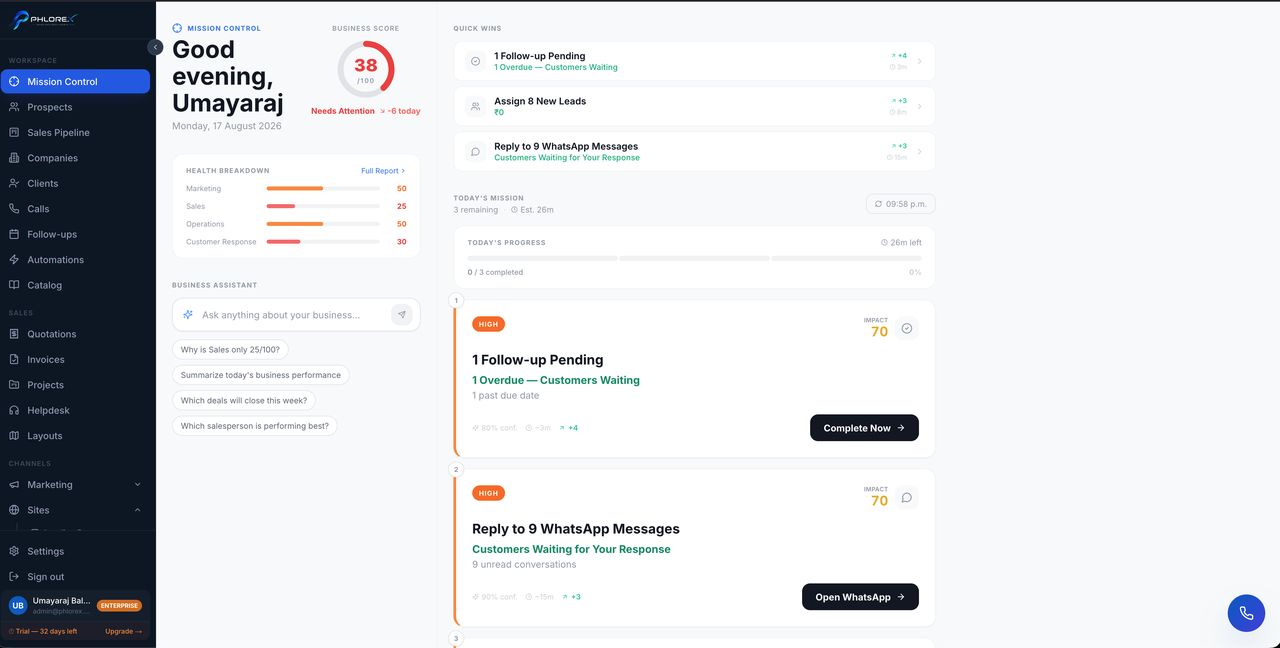
LeadOS is one workspace for the whole customer journey — from the moment an enquiry arrives to the moment an invoice is paid. Instead of separate tools for CRM, marketing, messaging, finance and operations, everything shares one login, one customer record, and one set of permissions.
How the sidebar is organised
| Group | What lives there |
|---|---|
| Workspace | Your daily work — Mission Control, prospects, pipeline, companies, clients, calls, follow-ups, automations, catalog |
| Sales | What you sell and deliver — quotations, invoices, projects, helpdesk, layouts |
| Channels | How you reach people — marketing, sites, WhatsApp, Business WhatsApp, PBX |
| Operations | Running the business — finance, HR, inventory |
| Insights | Reports, documents, integrations |
| Settings | Workspace configuration and billing |
Names differ by industry. A real-estate workspace says Prospects and Clients where another says Leads and Customers — the screen is the same, only the wording is tuned to your business. This guide uses the real-estate wording throughout.
You only see what you have
LeadOS is module-gated. Your sidebar shows the sections included in your plan and hides the rest, so two colleagues on different plans see different menus. See Modules and plans.
Cannot find what you need?
Something not behaving as described here? Tell us and we will fix the page.