
Browse help sections
Your workspace at a glance
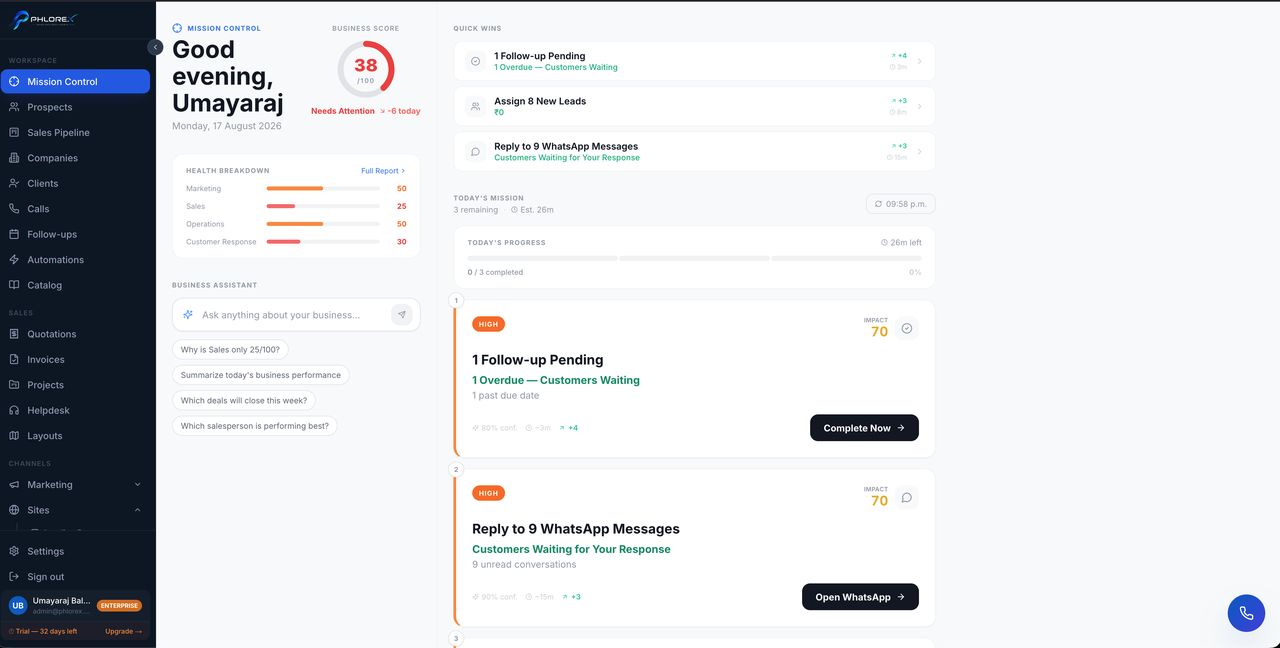
Every screen shares the same three zones, so learning them once means you can find your way anywhere.
The sidebar
Grouped by the kind of work it does. Sections with sub-pages — Marketing, Sites, WhatsApp, Business WhatsApp, PBX, Finance, HR — expand in place. Your plan and trial status sit at the bottom, next to your name.
The header
Today's date, search, light/dark toggle, notifications, and your profile menu, which holds Settings and Sign out.
The work area
List screens follow one pattern throughout: counters or filters at the top, records in the middle, and a detail view when you open one. Anything you can create has a primary button in the top right.
Documents LeadOS numbers all share one shape — a prefix, the year, then a sequence: LYT-2026-000002, TKT-2026-000042, EMP-2026-000001. The prefix tells you the type at a glance.
Finding anything, in four moves
- Pick the sidebar group that matches the kind of work — Workspace, Sales, Channels, Operations, Insights.
- Open the section. Sections with an arrow expand to show their sub-pages.
- Use the filters or search at the top of the list to narrow it.
- Open a record to see its detail, tabs and history.
Cannot find what you need?
Something not behaving as described here? Tell us and we will fix the page.