
Browse help sections
Prospects
PRORequires the pro plan or above.
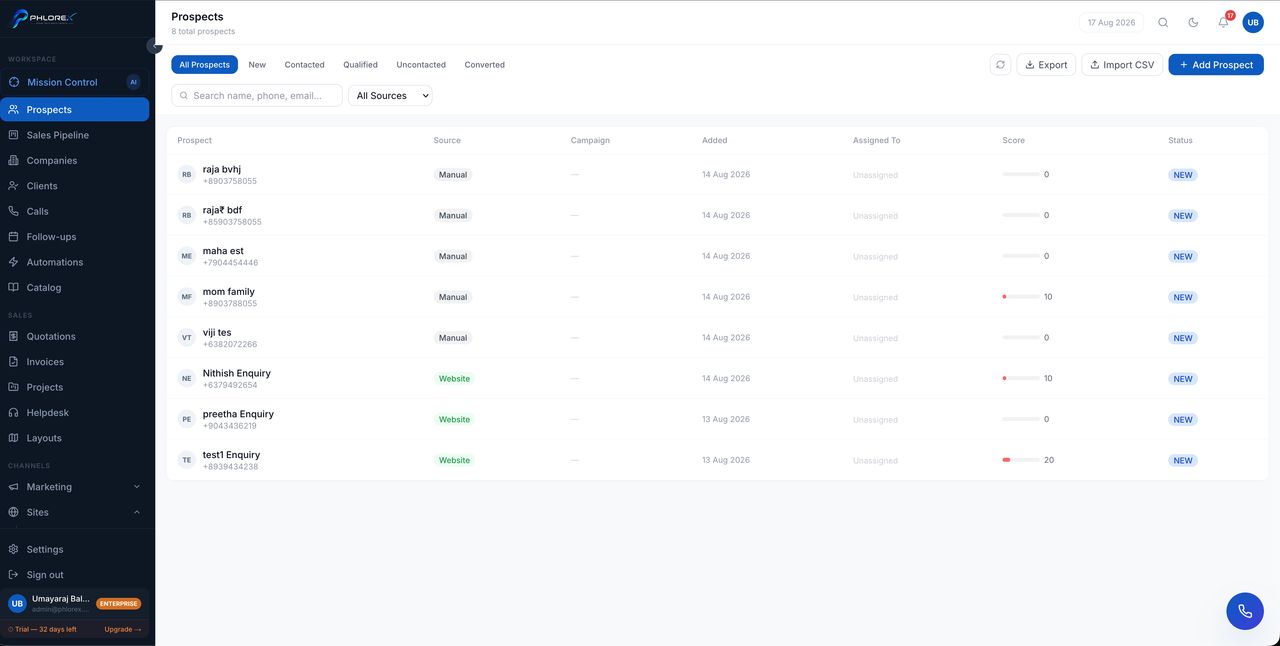
A prospect is one person who might buy from you. Every connected channel feeds this list, so it is the first place to look each morning.
Workspace›Prospects
The list
The header shows the total count. Tabs filter by stage — All, New, Contacted, Qualified, Uncontacted, Converted — and you can search by name, phone or email, or filter by source.
| Column | What it shows |
|---|---|
| Prospect | Name and how they reached you |
| Source | Channel — Website, Google, Facebook Ads, WhatsApp, Instagram, Referral, Manual |
| Campaign | The campaign that produced them, where known |
| Added | When they arrived |
| Assigned To | Who owns them |
| Score | Lead score |
| Status | Where they are in your process |
Adding and importing
- Select Add Lead for a single prospect — name, one contact method, source, and an owner.
- Use Import CSV for a list: match your columns to LeadOS fields, review the preview, then confirm.
- Use Export to take the current filtered list out as a file.
Important
Import ten rows first and check the result before importing thousands. Undoing a bad bulk import means deleting records one at a time.
Tip
An unassigned prospect is nobody's job. Assign on creation, or use an automation to do it for you.
Cannot find what you need?
Something not behaving as described here? Tell us and we will fix the page.